Einleitung
systemd, also known as system daemon, is a kind of init software under GNU/Linux operating system.
Anlässe der Entwicklung:
- to provide a better framework for representing dependencies between services
- implements parallel startup of services at system initialization
- reduces shell overhead and replaces SysV style init
systemd bietet eine Reihe von Systemkomponenten für das GNU/Linux-Betriebssystem, um die Dienstkonfiguration und das Verhalten über GNU/Linux-Distributionen hinweg zu vereinheitlichen und Unterschiede in ihrer Verwendung zu beseitigen.
Since 2015, most GNU/Linux distributions have adopted systemd to replace traditional init programs such as SysV. It is worth noting that many of the concepts and designs of systemd are inspired by Apple Mac OS's launchd.
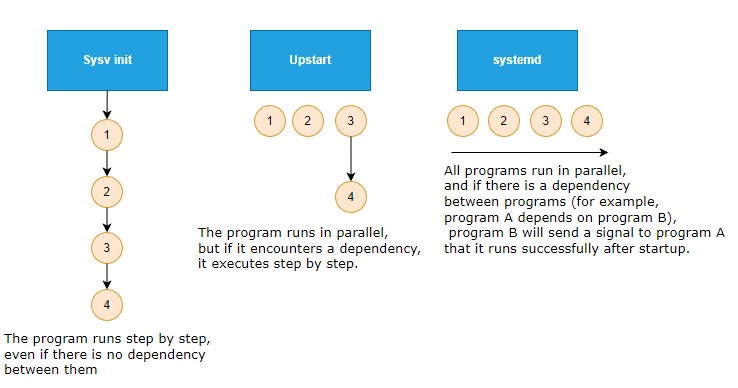
The emergence of systemd caused massive controversy in the open source community.
Lob:
- Developers and users have praised
systemdfor eliminating the usage differences between GNU/Linux and providing a more stable and faster out-of-the-box solution.
Kritik:
systemdtakes over too many components on the operating system, violating UNIX's KISS (Keep It Simple, Stupid) principle.- From a code perspective,
systemdis too complex and cumbersome, with over a million lines of code, thus reducing maintainability and increasing attack surface.
Official website - https://systemd.io/ The GitHub repository - https://github.com/systemd/systemd
Entwicklungsgeschichte
In 2010, two Red Hat software engineers, Lennart Poettering and Kay Sievers, developed the first version of systemd to replace the traditional SysV.


In May 2011, Fedora 15 became the first GNU/Linux distribution to enable systemd by default, with the reason given at the time:
systemdbietet aggressive Parallelisierungsfunktionen, verwendet Socket- und D-Bus-Aktivierung zum Starten von Diensten, bietet das Starten von Daemons nach Bedarf, verfolgt Prozesse mithilfe von Linux-Cgroups, unterstützt das Erstellen von Snapshots und die Wiederherstellung des Systemstatus, verwaltet Mount- und Automount-Punkte und implementiert eine leistungsstarke, transaktionale, abhängigkeitsbasierte Dienststeuerungslogik. It can work as a drop-in replacement for sysvinit.
In October 2012, Arch Linux booted with systemd by default.
From October 2013 to February 2014, the Debian Technical Committee had a lengthy debate on the Debian mailing list, focusing on "which init should be used by Debian 8 Jessie as the system default" and finally decided to use systemd.
In February 2014, Ubuntu adopted systemd as its init and abandoned its own Upstart.
In August 2015, systemd began providing login shells callable through machinectl.
Im Jahr 2016 wurde in systemd eine Sicherheitslücke entdeckt, die es jedem nicht privilegierten Benutzer ermöglicht, einen „Denial-of-Service-Angriff“ auf systemd durchzuführen.
In 2017, systemd discovered another security vulnerability - CVE-2017-9445. Remote attackers can trigger a buffer overflow vulnerability and execute malicious code through malicious DNS responses.
Info
Pufferüberlauf: Hierbei handelt es sich um einen Fehler im Programmdesign, der in den Eingabepuffer eines Programms schreibt und diesen zum Überlauf bringt (normalerweise mehr Daten als die maximale Datenmenge, die im Puffer gespeichert werden kann). Dadurch wird der Programmbetrieb unterbrochen, die Gelegenheit der Unterbrechung ausgenutzt und die Kontrolle über das Programm oder sogar das System erlangt.
Architektur-Design
Here, the author chose as an example of systemd the one used by Samsung's Tizen to illustrate its architecture.
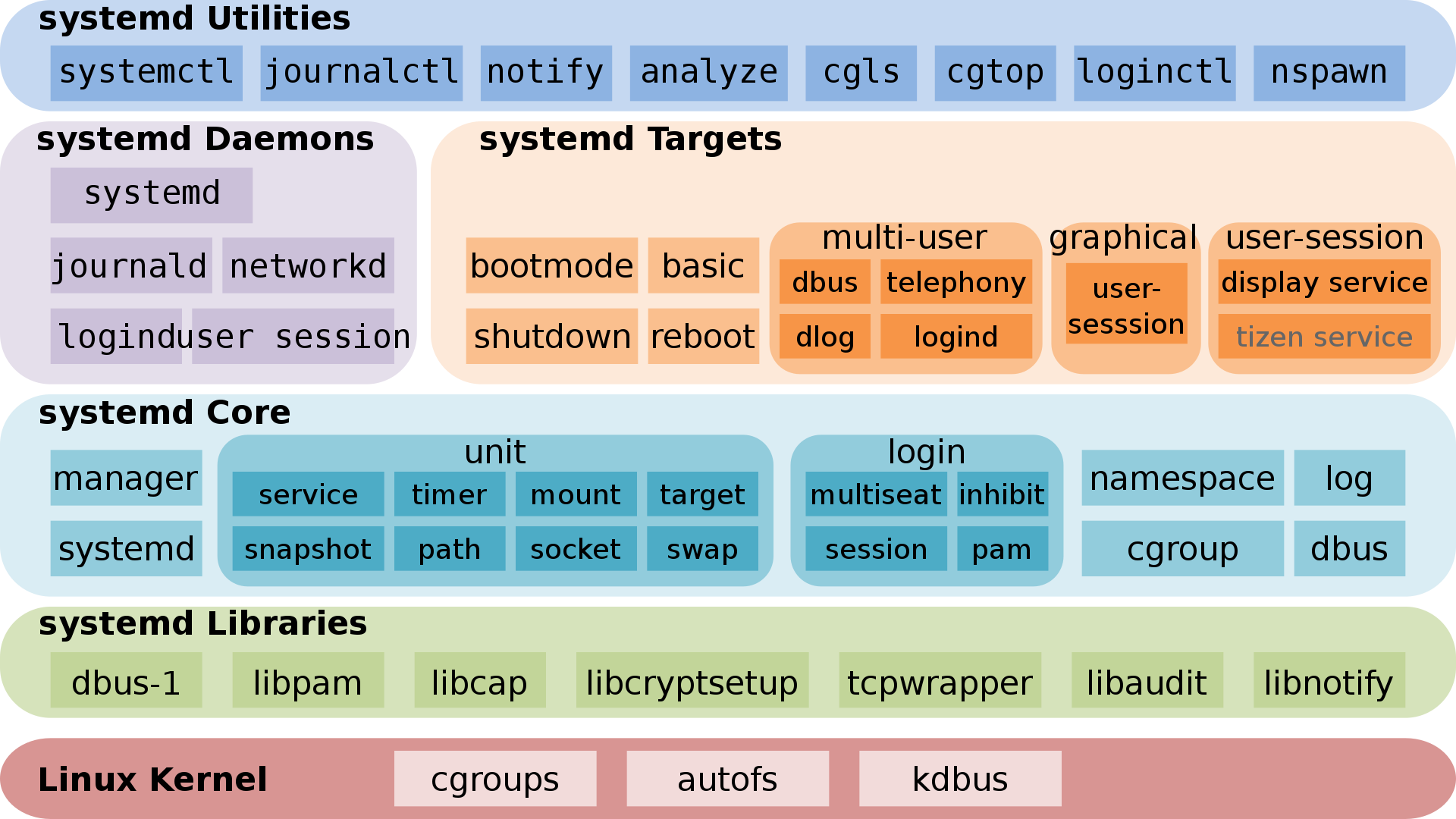
Info
Tizen - A mobile operating system based on the Linux kernel, supported by the Linux Foundation, mainly developed and used by Samsung.
Info
Some "targets" of systemd do not belong to systemd components, such as telephony, bootmode, dlog, tizen service, they belong to Tizen.
systemd uses a modular design. Many configuration switches exist at compile time to determine what will or will not be built, similar to the Linux kernel's modular design. When compiled, systemd can have up to 69 binary executables that perform the following tasks, including:
systemdruns with PID 1 and provides the startup of as many parallel services as possible. This also manages the shutdown sequence.- The
systemctlprogram provides a user interface for service management. - Support for SysV and LSB scripts are also provided to ensure compatibility.
- Compared to SysV,
systemdservice management and reporting can output more detailed information. - By mounting and unmounting file systems in layers,
systemdcan cascade mounted file systems more securely. systemdprovides management of basic component configuration, including hostname, time and date, locale, log, and so on.- Provides management of sockets.
systemdtimers provide functions similar to cron scheduled tasks.- Support for the creation and management of temporary files, including deletion.
- The D-Bus interface allows running scripts when a device is inserted or removed. In this way, all devices, whether pluggable or not, can be regarded as plug-and-play devices, thus greatly simplifying the device processing.
- The startup sequence analysis tool can be used to locate the service that takes the longest time.
- The management of logs and service logs.
systemd is not just an initialization program, it is a large software suite that takes over many system components.
systemd als PID 1
The systemd mount is determined by using the contents of the /etc/fstab file, including the swap partition.
The default "target" configuration is determined by using /etc/systemd/system/default.target.
Previously, with SysV initialization, there was the concept of a runlevel. With systemd, there is also a related compatibility comparison table as shown below (List in descending order by number of dependencies):
| systemd targets | SystemV runlevel | Target-alias (soft link) | Beschreibung |
|---|---|---|---|
| default.target | This "target" is always a soft link to "multi-user.target" or "graphical.target". systemd always uses "default.target" to start the system. Bitte beachten! It cannot be a soft link to "halt.target", "poweroff.target" or "reboot.target". |
||
| graphical.target | 5 | runlevel5.target | GUI-Umgebung. |
| 4 | runlevel4.target | Reserviert und unbenutzt. In the SysV initialization program, runlevel4 is the same as runlevel3. In the systemd initialization program, users can create and customize this "target" to start local services without changing the default "multi-user.target". |
|
| multi-user.target | 3 | runlevel3.target | Full multi-user command line mode. |
| 2 | In SystemV, it refers to the multi-user command line mode that does not include the NFS service. | ||
| rescue.target | 1 | runlevel1.target | In SystemV, it is called single-user mode, which starts minimal services and does not start other additional programs or drivers. It is mainly used to repair the operating system. It is similar to the security mode of the Windows operating system. |
| emergency.target | Basically equivalent to "rescue.target". | ||
| reboot.target | 6 | runlevel6.target | neu starten. |
| poweroff.target | 0 | runlevel0.target | Shut down the operating system and power off. |
Shell > find  / -iname  runlevel?\.target -a -type l -exec ls -l {} \;
lrwxrwxrwx 1 root root 17 8月  23 03:05 /usr/lib/systemd/system/runlevel4.target -> multi-user.target
lrwxrwxrwx 1 root root 17 8月  23 03:05 /usr/lib/systemd/system/runlevel3.target -> multi-user.target
lrwxrwxrwx 1 root root 13 8月  23 03:05 /usr/lib/systemd/system/runlevel6.target -> reboot.target
lrwxrwxrwx 1 root root 13 8月  23 03:05 /usr/lib/systemd/system/runlevel1.target -> rescue.target
lrwxrwxrwx 1 root root 16 8月  23 03:05 /usr/lib/systemd/system/runlevel5.target -> graphical.target
lrwxrwxrwx 1 root root 15 8月  23 03:05 /usr/lib/systemd/system/runlevel0.target -> poweroff.target
lrwxrwxrwx 1 root root 17 8月  23 03:05 /usr/lib/systemd/system/runlevel2.target -> multi-user.target

Shell > ls -l /etc/systemd/system/default.target
lrwxrwxrwx. 1 root root 41 12月 23 2022 /etc/systemd/system/default.target -> /usr/lib/systemd/system/multi-user.target
Each "target" has a set of dependencies described in its configuration file, which are the services required to run the GNU/Linux host at a specific runlevel. The more features you have, the more dependencies the "target" requires. Eine GUI-Umgebung benötigt beispielsweise mehr Dienste als ein Befehlszeilenmodus.
From the man page (man 7 bootup), we can consult the boot diagram of systemd:
 local-fs-pre.target
                    |
                    v
           (various mounts and   (various swap   (various cryptsetup
            fsck services...)     devices...)        devices...)       (various low-level   (various low-level
                    |                  |                  |             services: udevd,     API VFS mounts:
                    v                  v                  v             tmpfiles, random     mqueue, configfs,
             local-fs.target      swap.target     cryptsetup.target    seed, sysctl, ...)      debugfs, ...)
                    |                  |                  |                    |                    |
                    \__________________|_________________ | ___________________|____________________/
                                                         \|/
                                                          v
                                                   sysinit.target
                                                          |
                     ____________________________________/|\________________________________________
                    /                  |                  |                    |                    \
                    |                  |                  |                    |                    |
                    v                  v                  |                    v                    v
                (various           (various               |                (various          rescue.service
               timers...)          paths...)              |               sockets...)               |
                    |                  |                  |                    |                    v
                    v                  v                  |                    v              rescue.target
              timers.target      paths.target             |             sockets.target
                    |                  |                  |                    |
                    v                  \_________________ | ___________________/
                                                         \|/
                                                          v
                                                    basic.target
                                                          |
                     ____________________________________/|                                 emergency.service
                    /                  |                  |                                         |
                    |                  |                  |                                         v
                    v                  v                  v                                 emergency.target
                display-        (various system    (various system
            manager.service         services           services)
                    |             required for            |
                    |            graphical UIs)           v
                    |                  |           multi-user.target
                    |                  |                  |
                    \_________________ | _________________/
                                      \|/
                                       v
                             graphical.target
- "sysinit.target" and "basic.target" are checkpoints during the startup process. Obwohl eines der Designziele von
systemddarin besteht, Systemdienste parallel zu starten, ist es notwendig, dietargetsbestimmter Dienste und Funktionen zu starten, bevor andere Dienste undtargetsgestartet werden - After the "units" that "sysinit.target" depends on are completed, the startup will move to the "sysinit.target" phase. These "units" can be started in parallel, including:
- Mount des Dateisystems
- Einrichten der Auslagerungsdatei
- udev starten
- Set Random Generator seed
- Low-Level Dienste starten
- Set up encryption services
sysinit.targetstartet alle Low-Level-Dienste undunits, die für die wesentlichen Funktionen des Betriebssystems erforderlich sind, bevor die Phasebasic.targetbeginnt.- After completing the "sysinit.target" phase,
systemdstarts all the "units" required to complete the next "target" (that is, "basic.target"). The target provides additional functions, including: - Set the directory paths for the various executable files.
- Kommunikations-Sockets
- Timer
- Finally, initialization is performed for the user-level "target" ("multi-user.target" or "graphical.target").
systemdmust arrive at "multi-user.target" before entering "graphical.target".
You can run the following command to see the dependencies required for full startup:
Shell > systemctl list-dependencies multi-user.target
multi-user.target
● ├─auditd.service
● ├─chronyd.service
● ├─crond.service
● ├─dbus.service
● ├─irqbalance.service
● ├─kdump.service
● ├─NetworkManager.service
● ├─sshd.service
● ├─sssd.service
● ├─systemd-ask-password-wall.path
● ├─systemd-logind.service
● ├─systemd-update-utmp-runlevel.service
● ├─systemd-user-sessions.service
● ├─tuned.service
● ├─basic.target
● │ ├─-.mount
● │ ├─microcode.service
● │ ├─paths.target
● │ ├─slices.target
● │ │ ├─-.slice
● │ │ └─system.slice
● │ ├─sockets.target
● │ │ ├─dbus.socket
● │ │ ├─sssd-kcm.socket
● │ │ ├─systemd-coredump.socket
● │ │ ├─systemd-initctl.socket
● │ │ ├─systemd-journald-dev-log.socket
● │ │ ├─systemd-journald.socket
● │ │ ├─systemd-udevd-control.socket
● │ │ └─systemd-udevd-kernel.socket
● │ ├─sysinit.target
● │ │ ├─dev-hugepages.mount
● │ │ ├─dev-mqueue.mount
● │ │ ├─dracut-shutdown.service
● │ │ ├─import-state.service
● │ │ ├─kmod-static-nodes.service
● │ │ ├─ldconfig.service
● │ │ ├─loadmodules.service
● │ │ ├─nis-domainname.service
● │ │ ├─proc-sys-fs-binfmt_misc.automount
● │ │ ├─selinux-autorelabel-mark.service
● │ │ ├─sys-fs-fuse-connections.mount
● │ │ ├─sys-kernel-config.mount
● │ │ ├─sys-kernel-debug.mount
● │ │ ├─systemd-ask-password-console.path
● │ │ ├─systemd-binfmt.service
● │ │ ├─systemd-firstboot.service
● │ │ ├─systemd-hwdb-update.service
● │ │ ├─systemd-journal-catalog-update.service
● │ │ ├─systemd-journal-flush.service
● │ │ ├─systemd-journald.service
● │ │ ├─systemd-machine-id-commit.service
● │ │ ├─systemd-modules-load.service
● │ │ ├─systemd-random-seed.service
● │ │ ├─systemd-sysctl.service
● │ │ ├─systemd-sysusers.service
● │ │ ├─systemd-tmpfiles-setup-dev.service
● │ │ ├─systemd-tmpfiles-setup.service
● │ │ ├─systemd-udev-trigger.service
● │ │ ├─systemd-udevd.service
● │ │ ├─systemd-update-done.service
● │ │ ├─systemd-update-utmp.service
● │ │ ├─cryptsetup.target
● │ │ ├─local-fs.target
● │ │ │ ├─-.mount
● │ │ │ ├─boot.mount
● │ │ │ ├─systemd-fsck-root.service
● │ │ │ └─systemd-remount-fs.service
● │ │ └─swap.target
● │ │   └─dev-disk-by\x2duuid-76e2324e\x2dccdc\x2d4b75\x2dbc71\x2d64cd0edb2ebc.swap
● │ └─timers.target
● │   ├─dnf-makecache.timer
● │   ├─mlocate-updatedb.timer
● │   ├─systemd-tmpfiles-clean.timer
● │   └─unbound-anchor.timer
● ├─getty.target
● │ └─getty@tty1.service
● └─remote-fs.target
You can also use the --all option to expand all "units".
systemd-Verwendung
Unit-Typen
Der Befehl systemctl ist das Hauptwerkzeug zur Verwaltung der „Units“ und der zugehörigen Dateien von systemd.
systemd manages so-called "units", which are representations of system resources and services. The following list shows the "unit" types that systemd can manage:
- service - A service on the system, including instructions for starting, restarting, and stopping the service. Siehe
man 5 systemd.service. - socket - A network socket associated with a service. Siehe
man 5 systemd.socket. - device - A device specifically managed with
systemd. Sieheman 5 systemd.device. - mount - A mount point managed with
systemd. Sieheman 5 systemd.mount. - automount - A mount point automatically mounted on boot. Siehe
man 5 systemd.automount. - swap - Swap space on the system. Siehe
man 5 systemd.swap. - target - A synchronization point for other units. Usually used to start enabled services on boot. Siehe
man 5 systemd.target. - path - A path for path-based activation. For example, you can start services based on the state of a certain path, such as whether it exists or not. Siehe
man 5 systemd.path. - timer - A timer to schedule activation of another unit. Siehe
man 5 systemd.timer. - snapshot - A snapshot of the current
systemdstate. Usually used to rollback after making temporary changes tosystemd. - slice - Restriction of resources through Linux Control Group nodes (cgroups). Siehe
man 5 systemd.slice. - scope - Information from
systemdbus interfaces. Usually used to manage external system processes. Sieheman 5 systemd.scope.
Operational "units"
The usage of the systemictl command is - systemctl [OPTIONS...] COMMAND [UNIT...].
COMMAND can be divided into:
- Unit-Kommandos
- Unit File Commands
- Maschinen-Kommandos
- Job-Kommandos
- Umgebung-Kommandos
- Manager Lifecycle Commands
- System-Kommandos
You can use systemctl --help to discover the details.
Here are some common operational demonstration commands:
# Start the service
Shell > systemctl start sshd.service

# Stop the service
Shell > systemctl stop sshd.service

# Reload the service
Shell > systemctl reload sshd.service

# Restart the service
Shell > systemctl restart sshd.service

# View the status of the service
Shell > systemctl status sshd.service

# The service starts automatically after the system starts
Shell > systemctl enable sshd.service

# The service stops automatically after the system starts
Shell > systemctl disable sshd.service

# Check if the service automatically starts after startup
Shell > systemctl is-enabled sshd.service

# Mask one unit
Shell > systemctl mask sshd.service

# Unmask one unit
Shell > systemctl unmask sshd.service

# View the file contents of unit
Shell > systemctl cat sshd.service

# Edit the contents of the unit file and save it in the /etc/systemd/system/ directory after editing
Shell > systemctl edit sshd.service

# View the complete properties of unit
Shell > systemctl show sshd.service
Info
Die oben genannten Operationen können Sie mit einer einzigen Befehlszeile auf einer oder mehreren Units-Einheiten ausführen. Die oben genannten Operationen sind nicht auf .service beschränkt.
Apropos "Units":
# List all currently running units.
Shell > systemctl
## or
Shell > systemctl list-units
## You can also add "--type=TYPE" for type filtering
Shell > systemctl --type=target

# List all unit files. You can also filter using "--type=TYPE"
Shell > systemctl list-unit-files
Apropos "targets":
# Query current "target" ("runlevel") information
Shell > systemctl get-default
multi-user.target

# Switch "target"("runlevel"). For example, you need to switch to the GUI environment
Shell > systemctl isolate graphical.target

# Define the default "target" ("runlevel")
Shell > systemctl set-default graphical.target
Wichtige Verzeichnisse
Three main important directories exist, arranged in ascending order of priority:
- /usr/lib/systemd/system/ - Systemd unit files distributed with installed RPM packages. Similar to the /etc/init.d/ directory for Centos 6.
- /run/systemd/system/ - Systemd unit files created at run time.
- /etc/systemd/system/ - Systemd unit files created by
systemctl enableas well as unit files added for extending a service.
systemd configuration files
Siehe man 5 systemd-system.conf:
Wenn
systemdals Systeminstanz ausgeführt wird, interpretiert es die Konfigurationsdateisystem.confund die Dateien in den Verzeichnissensystem.conf.d. Wenn es als Benutzerinstanz ausgeführt wird, interpretiert es die Konfigurationsdateiuser.conf(entweder im Home-Verzeichnis des Benutzers oder, falls nicht gefunden, unter/etc/systemd/) und die Dateien in den Verzeichnissenuser.conf.d. These configuration files contain a few settings controlling basic manager operations.
In the Rocky Linux 8.x operating system, the relevant configuration files are:
- /etc/systemd/system.conf - Edit the file to change the Settings. Deleting the file restores the default Settings. Siehe
man 5 systemd-system.conf - /etc/systemd/user.conf - You can override the directives in this file by creating files in "/etc/systemd/user.conf.d/*.conf". Siehe
man 5 systemd-user.conf
systemd units file content description
Take the file sshd.service as an example:
Shell > systemctl cat sshd.service
[Unit]
Description=OpenSSH server daemon
Documentation=man:sshd(8) man:sshd_config(5)
After=network.target sshd-keygen.target
Wants=sshd-keygen.target

[Service]
Type=notify
EnvironmentFile=-/etc/crypto-policies/back-ends/opensshserver.config
EnvironmentFile=-/etc/sysconfig/sshd
ExecStart=/usr/sbin/sshd -D $OPTIONS $CRYPTO_POLICY
ExecReload=/bin/kill -HUP $MAINPID
KillMode=process
Restart=on-failure
RestartSec=42s

[Install]
WantedBy=multi-user.target
As you can see, the content of the unit file has the same style as the configuration file of the RL 9 network card. It uses [ and ] to include the title, and below the title are the relevant key-value pairs.
# RL 9
Shell > cat /etc/NetworkManager/system-connections/ens160.nmconnection
[connection]
id=ens160
uuid=5903ac99-e03f-46a8-8806-0a7a8424497e
type=ethernet
interface-name=ens160
timestamp=1670056998

[ethernet]
mac-address=00:0C:29:47:68:D0

[ipv4]
address1=192.168.100.4/24,192.168.100.1
dns=8.8.8.8;114.114.114.114;
method=manual

[ipv6]
addr-gen-mode=default
method=disabled

[proxy]
Usually three titles exist for the ".service" type unit:
- Unit
- Service
-
Install
-
Unit-Title
The following key-value pairs are usable:
Description=OpenSSH server daemon. The string is used to describe the "unit".Documentation=man:sshd(8) man:sshd_config(5). A space-separated list of URIs referencing documentation for this "unit" or its configuration. Accepted are only URIs of the types "http://", "https://", "file:", "info:", "man:".After=network.target sshd-keygen.target. Defines the startup sequence relationship with other "units". In this example, "network.target" and "sshd-keygen.target" start first, and "sshd.service" starts last.Before=. Define the startup sequence relationship with other "units".Requires=. Konfiguriert Abhängigkeiten von anderenUnits. The values can be multiple units separated by spaces. If the current "unit" is activated, the values listed here will also activate. If at least one of the listed values of "unit" fails to activate successfully,systemddoes not start the current "unit".Wants=sshd-keygen.target. Similar to theRequireskey. The difference is that if the dependent unit fails to start, it will not affect the normal operation of the current "unit".BindsTo=. Similar to theRequireskey. The difference is that if any dependent "unit" fails to start, the current unit is stopped in addition to the "unit" that stops the dependency.PartOf=. Similar to theRequireskey. Der Unterschied besteht darin, dass, wenn eine abhängigeUnitnicht startet, zusätzlich zum Stoppen und Neustarten der abhängigen Einheiten auch die aktuelleUnitgestoppt und neu gestartet wird.Conflicts=. Its value is a "unit" list separated by spaces. If the "unit" listed by the value is running, the current "unit" cannot run.OnFailure=. When the current "unit" fails, the "unit" or "units" (separated by spaces) in the value activate(s).
Siehe man 5 systemd.unit.
- Service-Titel
The following key-value pairs are usable:
Type=notify. Configure the type of this ".service" unit, which can be one of the following:simple- The service starts as the main process. Das ist die Standardeinstellung.forking- The service calls forked processes and runs as part of the main daemon.exec- Similar tosimple. The service manager will start this unit immediately after executing the binary of the main service. Other successor units must remain blocked until after this point before they can continue to start.oneshot- Similar tosimple, except the process must exit beforesystemdstarts follow-up services.dbus- Similar tosimple, except the daemon acquires a name of the D-Bus bus.notify- Similar tosimple, except the daemon sends a notification message usingsd_notifyor an equivalent call after starting up.idle- Similar tosimple, except the execution of the service is delayed until all active jobs are dispatched.
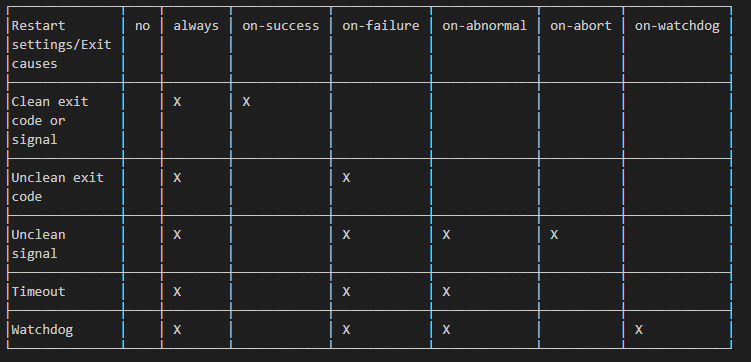
RemainAfterExit=. Whether the current service should be considered active when all processes of the service exit. Die Standardeinstellung istno.GuessMainPID=. The value is of type boolean and defaults to yes. In the absence of a clear location for the main process of the service, shouldsystemdguess the PID of the main process (which may not be correct). If you setType=forkingand do not setPIDFile, this key value pair will take effect. Otherwise, ignore the key value pair.PIDFile=. Specify the file path (absolute path) of the service PID. ForType=forkingservices, it is recommended to use this key-value pair.systemdreads the PID of the main process of the daemon after start-up of the service.BusName=. A D-Bus bus name to reach this service. This option is mandatory for services whereType=dbusis used.ExecStart=/usr/sbin/sshd -D $OPTIONS $CRYPTO_POLICY. The commands and arguments executed when the service starts.ExecStartPre=. Other commands run before commands inExecStart.ExecStartPost=. Other commands run after commands inExecStart.ExecReload=/bin/kill -HUP $MAINPID. The commands and arguments run when the service reloads.ExecStop=. The commands and arguments run when the service stops.ExecStopPost=. Additional commands to run after the service stops.RestartSec=42s. The time in seconds to sleep before restarting a service.TimeoutStartSec=. The time in seconds to wait for the service to start.TimeoutStopSec=. The time in seconds to wait for the service to stop.TimeoutSec=. A shorthand for configuring bothTimeoutStartSecandTimeoutStopSecsimultaneously.RuntimeMaxSec=. A maximum time in seconds for the service to run. Passesinfinity(the default) to configure no runtime limit.Restart=on-failure. Configures whether to restart the service when the service’s process exits, is killed, or reaches a timeout:no- The service will not restart. Das ist die Standardeinstellung.on-success- Restarts only when the service process exits cleanly (exit code 0).on-failure- Restarts only when the service process does not exit cleanly (node-zero exit code).on-abnormal- Restarts if the process terminates with a signal or when a timeout occurs.on-abort- Restarts if the process exits due to an uncaught signal not specified as a clean exit status.on-watchdog- If set toon-watchdog, the service restarts only if the watchdog timeout expires.always- Startet immer neu.
Exit causes and the effect of the Restart= settings on them:
KillMode=process. Specifies how processes of this unit shall be killed. Its value can be one of the following:control-group- Default value. If set tocontrol-group, all remaining processes in the control group of this unit are killed on unit stop.process- Only the main process is killed.mixed- The SIGTERM signal is sent to the main process while the subsequent SIGKILL signal is sent to all remaining processes of the unit's control group.none- Does not kill any processes.
PrivateTmp=. Whether to use a private tmp directory. Based on certain security, the recommendation is to set the value to yes.ProtectHome=. Whether to protect the home directory. Its value can be one of the following:yes- Die drei Verzeichnisse (/root/, /home/, /run/user/) sind fürunitnicht sichtbar.no- The three directories are visible to unit.read-only- The three directories are read-only to unit.tmpfs- The temporary file system will be mounted in read-only mode on these three directories.
ProtectSystem=. The directory used to protect the system from modification by the service. Der Wert kann folgender sein:yes- Indicates that the process called by the unit will be mounted read-only to the /usr/ and /boot/ directories.no- Die Standardeinstellungfull- Indicates that the /usr/, /boot/, /etc/ directories are mounted read-only.strict- All file systems are mounted read-only (excluding virtual file system directories such as /dev/, /proc/, and /sys/).
EnvironmentFile=-/etc/crypto-policies/back-ends/opensshserver.config. Read environment variables from a text file. "-" means that if the file does not exist, the file will not be read and no errors or warnings will be logged.
Siehe man 5 systemd.service.
-
Install-Titel
-
Alias=. A list of additional names separated by spaces. Bitte beachten! Your additional name should have the same type (suffix) as the current unit. -
RequiredBy=oderWantedBy=multi-user.target. Define the unit of the current operation as a dependency of unit in the value. After the definition is complete, you can find the relevant files in the /etc/systemd/systemd/ directory. Zum Beispiel:Shell > systemctl is-enabled chronyd.service enabled Shell > systemctl cat chronyd.service ... [Install] WantedBy=multi-user.target Shell > ls -l /etc/systemd/system/multi-user.target.wants/ total 0 lrwxrwxrwx. 1 root root 38 Sep 25 14:03 auditd.service -> /usr/lib/systemd/system/auditd.service lrwxrwxrwx. 1 root root 39 Sep 25 14:03 chronyd.service -> /usr/lib/systemd/system/chronyd.service ←← lrwxrwxrwx. 1 root root 37 Sep 25 14:03 crond.service -> /usr/lib/systemd/system/crond.service lrwxrwxrwx. 1 root root 42 Sep 25 14:03 irqbalance.service -> /usr/lib/systemd/system/irqbalance.service lrwxrwxrwx. 1 root root 37 Sep 25 14:03 kdump.service -> /usr/lib/systemd/system/kdump.service lrwxrwxrwx. 1 root root 46 Sep 25 14:03 NetworkManager.service -> /usr/lib/systemd/system/NetworkManager.service lrwxrwxrwx. 1 root root 40 Sep 25 14:03 remote-fs.target -> /usr/lib/systemd/system/remote-fs.target lrwxrwxrwx. 1 root root 36 Sep 25 14:03 sshd.service -> /usr/lib/systemd/system/sshd.service lrwxrwxrwx. 1 root root 36 Sep 25 14:03 sssd.service -> /usr/lib/systemd/system/sssd.service lrwxrwxrwx. 1 root root 37 Sep 25 14:03 tuned.service -> /usr/lib/systemd/system/tuned.service -
Also=. Other units to install or uninstall when installing or uninstalling this unit.
Zusätzlich zu den oben genannten Handbuchseiten können Sie auch man 5 systemd.exec oder man 5 systemd.kill eingeben, um weitere Informationen zu erhalten.
Befehl im Zusammenhang mit anderen Komponenten
timedatactl- Fragt die Systemzeit- und Datumseinstellungen ab oder ändert sie.hostnamectl- Fragt den Systemhostnamen ab oder ändert ihn.localectl- Fragt Systemgebietsschema- und Tastatureinstellungen ab oder ändert diese.systemd-analyze- Profiliertsystemd, zeigt Unit-Abhängigkeiten an und überprüft Unit-Dateien.journalctl- Zeigt System- oder Dienstprotokolle an. Der Befehljournalctlist so wichtig, dass später ein eigener Abschnitt folgt, in dem seine Verwendung und die zu beachtenden Aspekte erläutert werden.loginctl- Sitzungsverwaltung für angemeldete Benutzer.
Author: tianci li
Contributors: Steven Spencer