Rocksmarker
Introduction
Rocksmarker began life as an idea to base an editor focused on Markdown by using Neovim as the base. The first commit for this project was in November 2024, and quickly became a usable, if not quite mature, product. The deputy team lead for the documentation project began using Rocksmarker in early 2025. Though projects such as these are always under development, it is now a mature and functional IDE. If you have a love for text-based editors and Neovim, I hope you will love Rocksmarker as much as the documentation team deputy does.
Neovim IDE for Markdown documentation
Rocksmarker is an experimental Neovim configuration designed to transform Neovim into a specialized IDE for Markdown-based documentation. It combines Neovim's extensibility with a curated selection of Lua plugins to create a focused, efficient, and feature-rich environment for technical writing, code documentation, and structured content creation.
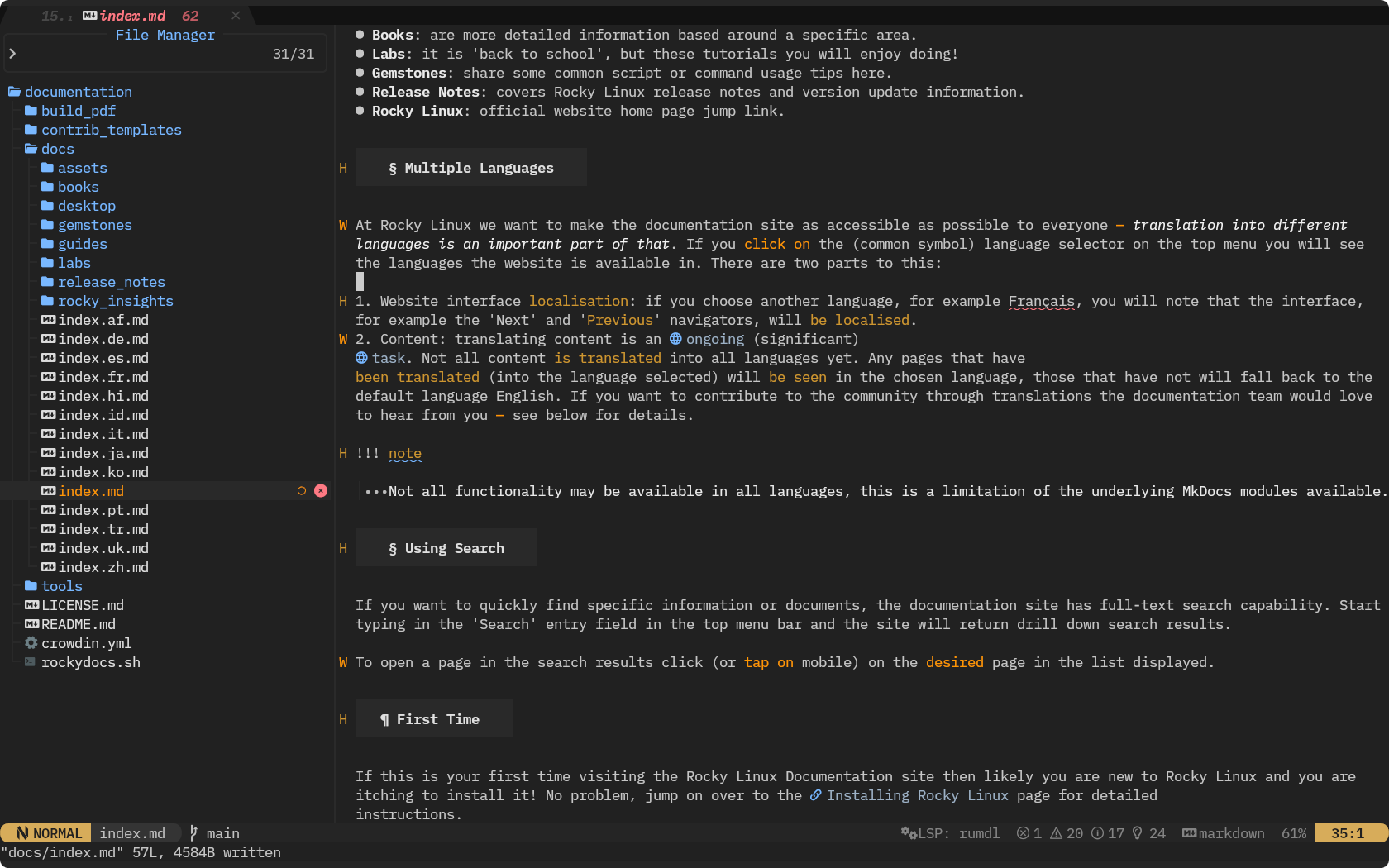
Built for developers and technical writers, Rocksmarker eliminates workflow
fragmentation by integrating real-time Markdown rendering, LSP-powered code
intelligence, and modular plugin management into a unified editing experience.
Unlike generic text editors, Rocksmarker prioritizes clarity, precision, and
productivity, ensuring that writing, coding, and formatting occur in a single,
cohesive interface.
By leveraging rocks.nvim for plugin management and Lumen-OSS tools for
configuration, Rocksmarker simplifies set up while maintaining flexibility and
performance.
Whether drafting API documentation, tutorials, or code-heavy articles,
Rocksmarker provides the tools and workflows needed to produce high-quality
content without leaving the editor. Its declarative, Lua-driven architecture
guarantees reproducibility, stability, and ease of maintenance, making it an
ideal choice for who demand both power and simplicity in their documentation
toolchain.
Markdown editing
Rocksmarker enhances Neovim as a powerful Markdown editor through two core plugins:
-
render-markdown.nvimProvides real-time visual rendering of Markdown elements such as headings, code blocks and lists directly in the editor. This eliminates the need for external previews, allowing you to see formatted content as you write. -
markdown-plus.nvimIntroduces modern editing features, including:- Smart list management (auto-continuation, indentation, and reordering).
- Text formatting shortcuts for bold, italics, links, and code spans.
- Efficient navigation between sections and references.
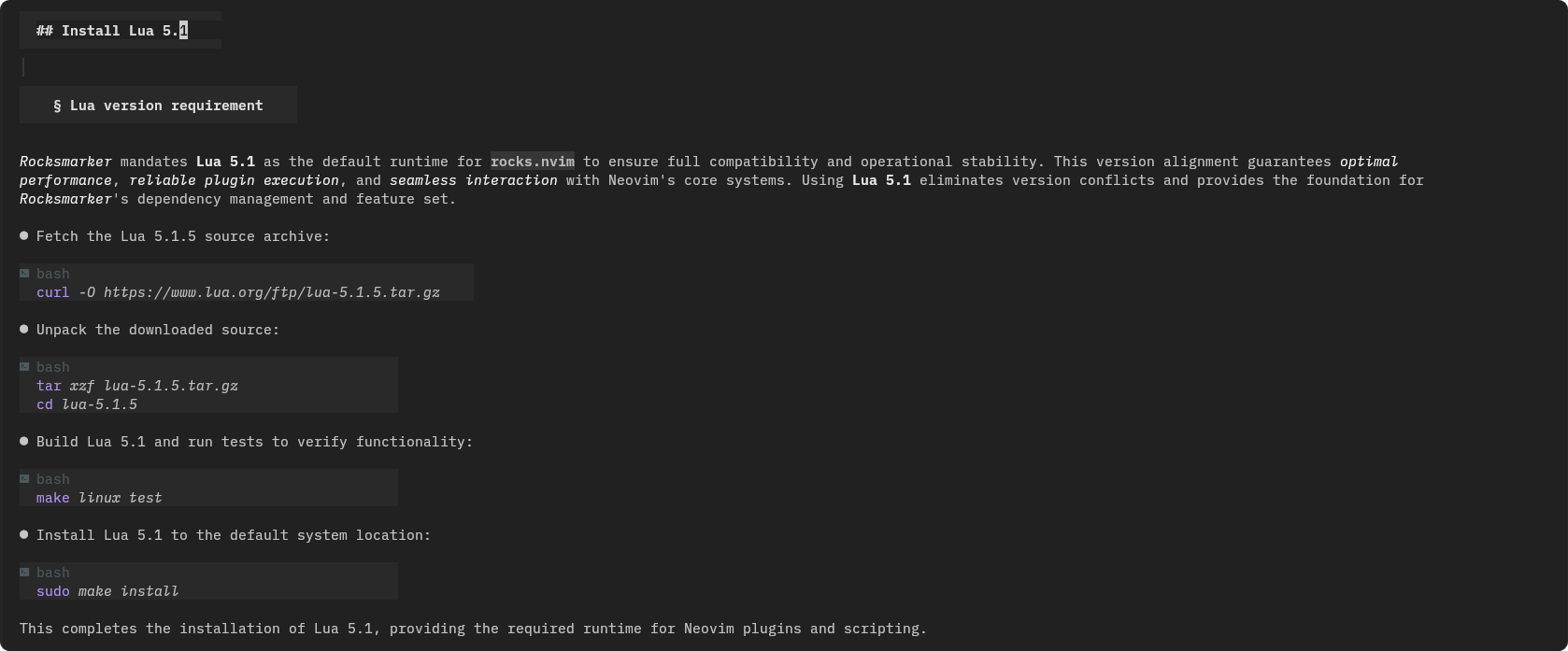
Together, these plugins streamline drafting, structuring, and refining documentation while maintaining focus and productivity.
Language server protocol
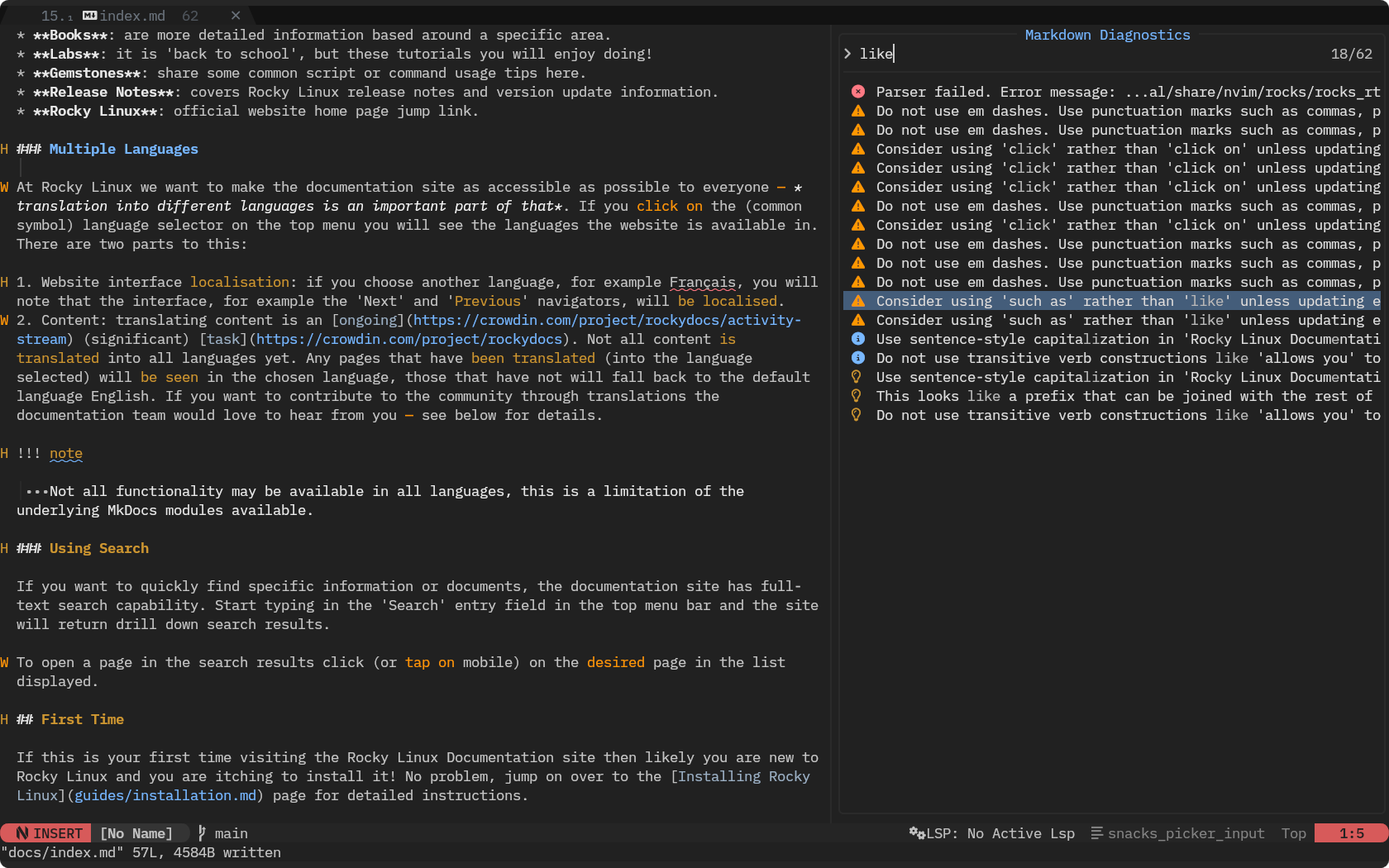
Rocksmarker uses Neovim's native LSP client to deliver robust support for Markdown syntax, structure, and content quality. The integration includes the following LSP servers for specific tasks:
-
marksmanvalidates Markdown syntax, ensuring correct tag usage, proper indentation, and right nesting of elements (e.g., headers, lists, code blocks, tables). -
rumdlvalidates and manipulates Markdown code, guaranteeing syntactic correctness and enabling programmatic modifications, such as restructuring or reformatting content. -
vale_lsenforces style guidelines, grammatical accuracy, and consistency in written content. -
harper_lsperforms advanced linting for readability and tone, ensuring professional and accessible text.
This setup ensures Markdown files remain structurally sound, functionally correct, and aligned with high standards of clarity and style.
The LSP workflow in Rocksmarker relies on three core plugins:
-
mason.nvimAutomates the installation and management of language servers, reducing manual setup. It handles versioning, dependencies, and path configurations, ensuring that the correct LSP servers are always available for your project. -
nvim-lspconfigProvides configured settings for a wide range of languages (e.g., Markdown, Lua, Rust). This plugin simplifies LSP integration, allowing you to enable language-specific features such as hover documentation, symbol navigation, and code actions with minimal configuration. -
mason-lspconfig.nvimBridges mason.nvim and nvim-lspconfig, automating the association between installed servers and their configurations. It ensures that language servers are correctly initialized when opening files, maintaining consistency across projects.
Rocksmarker delivers a unified editing experience by enabling users to write, debug, and document code within a single environment, eliminating tool switching. It enhances efficiency through autocompletion, linting, and real-time error detection directly in Markdown, minimizing the risk of undocumented or nonfunctional code snippets.
The solution scales effectively by supporting many languages in the same project, making it suitable for polyglot documentation, such as tutorials with code examples in different languages. Performance stays optimal, as language servers operate asynchronously to keep editor responsiveness even during resource-intensive tasks for project-wide symbol analysis.
Plugin management
rocks.nvim is a Lua-based plugin manager for Neovim, designed to
streamline dependency management through Luarocks, the standard package manager
for Lua modules.
Unlike traditional plugin managers, rocks.nvim treats plugins as Luarocks
packages, enabling direct installation, updates, and management within Neovim's
Lua runtime. This ensures version consistency, automatic dependency resolution,
and seamless integration with Neovim's native features.
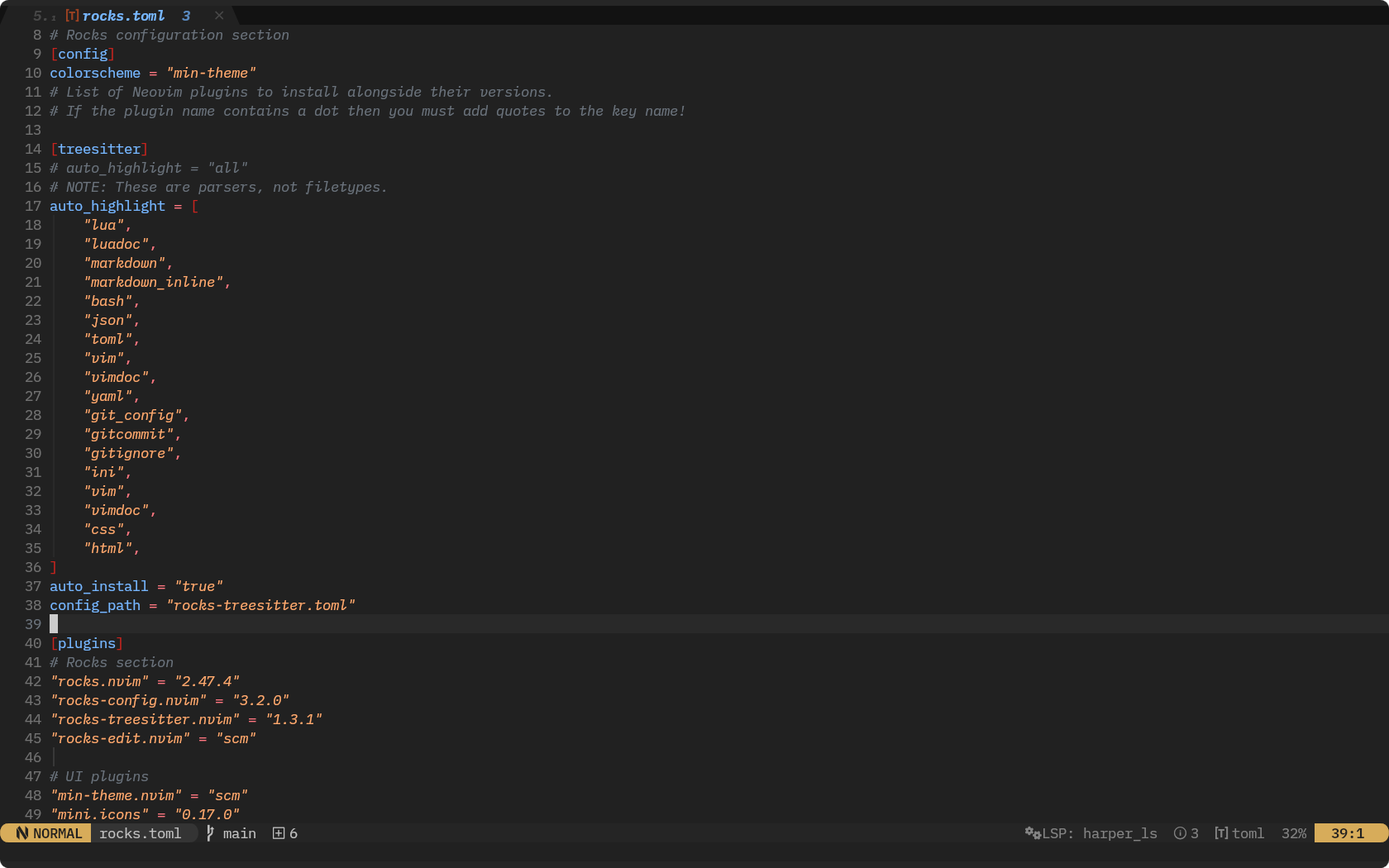
The manager uses a declarative configuration approach, where users define
plugins in a structured Lua table for consistent environment setup. It optimizes
performance with fast loading and minimal overhead, reducing startup time.
rocks.nvim maintains full compatibility with Neovim's Lua API, LSP, Tree-sitter,
and other modern features.
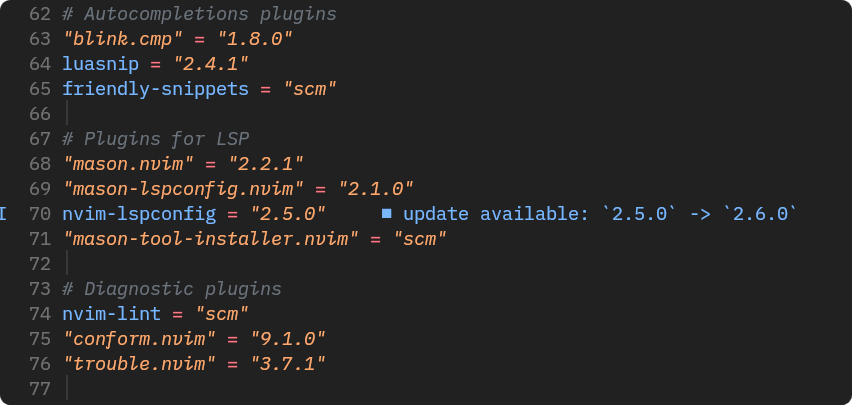
By using rocks.nvim, Rocksmarker ensures a reliable and maintainable plugin
ecosystem, where each component is explicitly declared and version-locked.
Core plugins
Rocksmarker integrates a curated set of plugins to enhance functionality and user experience:
UI and navigation
-
mini.themeandnvim-highlight-colorsOffer a cohesive visual theme and syntax highlighting for colors in code and Markdown. -
mini.iconsandmini.pairsImprove visual clarity with file-type icons and automatic bracket pairing. -
lualine.nvimandbufferline.nvimDeliver a customizable status line and efficient buffer management for quick file navigation. -
gitsigns.nvimDisplays Git changes directly in the editor, enabling real-time version control feedback. -
which-key.nvimOffers a menu for key bindings improving accessibility and workflow efficiency. -
rainbow-delimiters.nvimEnhances code readability by color-coding nested delimiters. -
persisted.nvimManages session persistence, allowing users to restore their workspace state. -
snacks.nvimProvides utility functions for module reloading, setting toggles, and window management. -
grug-far.nvimEnables advanced search-and-replace operations across files. -
neogitIntegrates a Git interface directly within Neovim for streamlined version control.
Autocompletion
-
blink.cmpOffers intelligent, context-aware code completion for faster development. -
luasnipProvides snippet expansion and management, supporting dynamic and customizable code templates.
Diagnostics and formatting
-
nvim-lintPerforms asynchronous linting to enforce code quality and adherence to standards. -
conform.nvimEnsures consistent code formatting across embedded blocks in Markdown. -
trouble.nvimProvides a streamlined diagnostic viewer for navigating and resolving errors from LSP and linters.
This plugin architecture ensures that Rocksmarker stays lightweight and adaptable, while offering a cohesive experience for technical writing and code documentation. We select each plugin for stability, functionality, and compatibility, aligning with Rocksmarker's goal of a distraction-free, powerful Markdown IDE.
Installation
This guide outlines the step-by-step process for installing Rocksmarker. You will configure Neovim, prepare the Lua 5.1 environment, and apply Rocksmarker settings. Each step ensures proper setup, performance optimization, and smooth integration with your development environment. By the end, you will have a fully operational Rocksmarker instance ready for advanced editing and plugin management.
Prerequisites
System requirements
-
Operating system: Rocky Linux 10 (or a compatible distribution such as RHEL or CentOS, Fedora)
-
Administrative permissions: Required to install Neovim and the required packages and configure Lua 5.1
-
Enable CRB repository: (for
ninja-build)sudo dnf config-manager --set-enabled crb -
Packages: Install the following packages:
sudo dnf install -y epel-release yum-utils npm ncurses readline-devel icu ninja-build cmake gcc make unzip gettext curl glibc-gconv-extra tar git
About CRB
Red Hat's CodeReady Builder (CRB) repository provides additional development
tools, libraries, and dependencies for Red Hat Enterprise Linux (RHEL) and
compatible distributions.
Designed to complement the base RHEL repositories, CRB offers open source
packages commonly required for software development, debugging, and system
administration.
Rocky Linux version
Rocksmarker requires Rocky Linux 10 or later.
Rocky Linux 9 and earlier versions use glibc 2.34, which is outdated and causes compatibility issues, especially with tools like rumdl and vale for code linting and analysis.
Upgrade to Rocky Linux 10 to ensure full functionality.
Getting around the glibc version issue with a container.
You can get around the glibc issue in older Rocky Linux versions by building Rocksmarker in a Rocky Linux 10.x container instead.
Install Neovim from source
To achieve the best performance and compatibility with Rocksmarker, compile Neovim from source. This method guarantees access to the new features, performance optimizations, and complete plugin support for Tree-sitter and LSP.
The result is a system-optimized Neovim installation that aligns with Rocksmarker's requirements.
- Clone the Neovim repository
Retrieve the latest Neovim source code from GitHub:
git clone https://github.com/neovim/neovim
cd neovim/
- Select the stable branch
Switch to the stable branch for a production-ready release:
git checkout stable
Using stable release
Omitting this step defaults to the development branch (0.13+), which might contain unfinished or experimental features.
- Compile with optimization
Build Neovim by using make with Release optimizations for performance:
make CMAKE_BUILD_TYPE=Release
- Install system-wide
Install the compiled binary to the system:
sudo make install
- Installation check
nvim --version
NVIM v0.12.2
Build type: Release
LuaJIT 2.1.1774638290
Run "nvim -V1 -v" for more info
This process ensures a clean, optimized Neovim installation from source.
Install Lua 5.1
Lua version requirement
Rocksmarker mandates Lua 5.1 as the default runtime for rocks.nvim to
ensure full compatibility and operational stability. This version alignment
guarantees optimal performance, reliable plugin execution, and
seamless interaction with Neovim's core systems. Using Lua 5.1 eliminates
version conflicts and provides the foundation for Rocksmarker's dependency
management and feature set.
- Fetch the Lua 5.1.5 source archive:
curl -O https://www.lua.org/ftp/lua-5.1.5.tar.gz
- Unpack the downloaded source:
tar xzf lua-5.1.5.tar.gz
cd lua-5.1.5
- Build and run tests to verify functionality:
make linux test
- Install to the default system location:
sudo make install
This completes the installation of Lua 5.1, providing the required runtime for Neovim plugins and scripting.
Installation path
This will install lua 5.1 to /usr/local/bin and its headers to /usr/local/include.
Configure Lua for rocks.nvim
This configuration isolates rocks.nvim from system-wide Lua installations,
guaranteeing plugin stability, consistent dependency resolution through
Luarocks, and predictable behavior.
Warning - Important step
Omitting this step risks plugin loading issues and inconsistent performance. Proper setup ensures Rocksmarker operates as intended.
- Append an alias for Lua 5.1 to the shell configuration:
echo "alias lua='/usr/local/bin/lua'" >> ~/.bashrc
- Apply the updated configuration:
. ~/.bashrc
- Confirm the installed Lua version:
lua -v
- Expected output
Lua 5.1.5 Copyright (C) 1994-2012 Lua.org, PUC-Rio
Lua header symlinks
When installing Lua 5.1 for use with rocks.nvim and Rocksmarker, linking
the Lua headers is essential because Luarocks requires access to these header
files during the compilation and installation of Lua modules.
The headers contain definitions and declarations necessary for building native Lua extensions and ensuring compatibility between Lua and the system libraries.
- Move to the system headers location:
cd /usr/include/
- Create a symbolic link
sudo mkdir lua && cd lua
sudo ln -s /usr/local/include/ 5.1
This ensures the system can locate Lua 5.1 headers during compilation, enabling compatibility with Neovim and other lua-dependent applications.
Download configuration
Rocksmarker provides two distinct setup configurations, tailored to your workflow needs:
- Primary Neovim Environment
- Replace your existing Neovim configuration with Rocksmarker, making it your default editing environment. This approach is ideal for users who want a fully integrated, production-ready setup with all features enabled out of the box.
- Isolated Testing Configuration
- Install Rocksmarker as a standalone configuration, keeping your current Neovim setup intact. This option is perfect for evaluation, development, or experimentation without affecting your main workflow.
Both methods ensure a seamless experience, whether you seek a permanent upgrade or a sandboxed trial. Choose based on your preference for stability or flexibility.
Use this option if you want Rocksmarker to be your default Neovim configuration for daily use.
git clone https://github.com/ambaradan/rocksmarker.git ~/.config/nvim
Use this option if you want to test Rocksmarker without affecting your current Neovim setup.
git clone https://github.com/ambaradan/rocksmarker.git ~/.config/rocksmarker/
This starts Neovim by using the Rocksmarker configuration, leaving your main setup unchanged.
Create an alias for easier access
echo "alias rocksmarker='NVIM_APPNAME=rocksmarker nvim'" >> ~/.bashrc
. ~/.bashrc
Install the configuration
Launch Neovim
nvim
NVIM_APPNAME=rocksmarker nvim
Rocks.nvim installation
- A bootstrap script will automatically install the
rocks.nvimplugin manager.

Synchronize plugins
- Follow the instructions on the screen and accept the synchronization of all plugins.
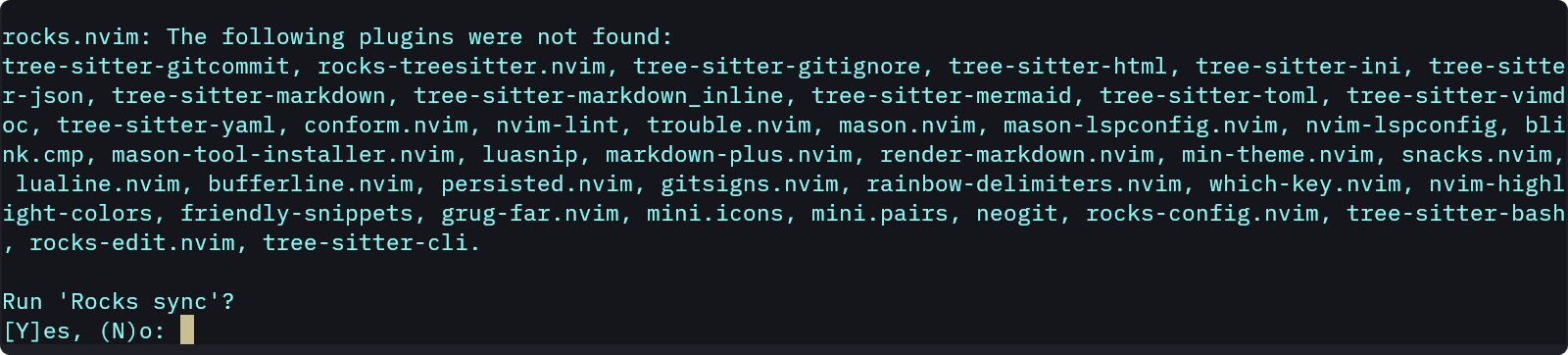
Plugins path
Plugins install to:
**.local/share/nvim/rocks/lib/luarocks/rocks-5.1/`**
Restart Neovim
- Close and reopen Neovim to load the new configurations.
Automatic LSP installation
On the second startup, the mason-lspconfig and
mason-tool-installer plugins will automatically install
all necessary language servers, linters and formatters.
Troubleshooting
- Logs: If you meet issues, check the installation logs with
:Rocks log - Dependencies: Install all required system dependencies, such as git, curl, and gcc
- Lua Version: Ensure Lua 5.1 is the default version to keep compatibility
with
rocks.nvim
Next steps
- Verify installation:
Open a Markdown file or run
:checkhealthto ensure everything is working correctly. - Start using Rocksmarker: Your environment is now ready for Markdown editing, coding, or any other task.
References
-
Lumen-OSS Organization focused on modernizing the Lua ecosystem. Lumen Labs develops tools such as Lux (package manager), Luanox (module hosting), and integration solutions for applications using Lua as a scripting language.
-
Luarocks Portal for distributing Luarocks packages, including those used in Rocksmarker.
-
mkdocs-material Documentation theme for Mkdocs, referenced for custom snippets in Rocksmarker.
-
CRB repository (CodeReady Linux Builder) Required repository for installing development tools on Rocky Linux.
-
Neovim Build Instructions Official guide for building Neovim from source.
-
Lua Official Download Page Source for downloading Lua 5.1, required for compatibility with Luarocks-based plugins.
-
Rocksmarker Framagit Repository Main repository for the Rocksmarker configuration.
-
Rocksmarker Guide English guide for Rocksmarker configuration and usage (under development).
Author: Franco Colussi
Contributors: Steven Spencer